
What is DNS TTL? Complete Information about TTLs
Last Updated: Aug 04, 2026
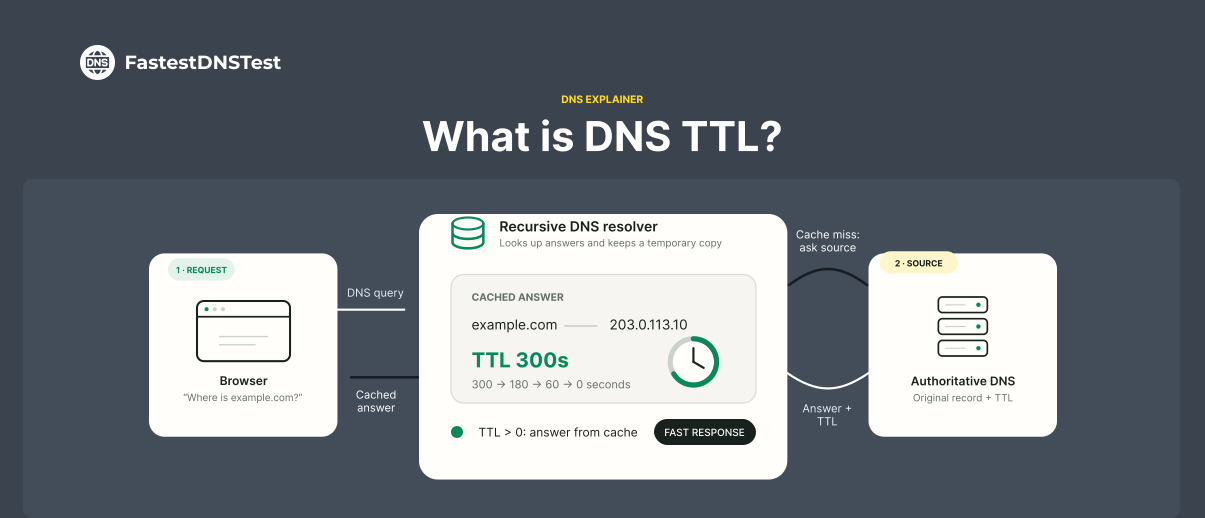
DNS TTL is the short form for Time to Live. It tells DNS resolvers how long to cache a query before requesting a new one. This information is saved in the cache of the recursive or local resolver for the TTL. All this happens before it goes back to get new and updated information.
Suppose the TTL of a DNS record is 7200 seconds. A DNS resolver looks up the record. Now it can store it for 2 hours only. During the whole time, it will use cached information.
How Does DNS TTL Work?
When you type a domain name, a DNS lookup determines the IP address of the website. The DNS resolver receives the correct IP address. It stores the information in its cache for the duration that DNS TTL specifies. Future requests for the same domain use this cache record. They don’t perform another DNS lookup. It helps websites to load faster. Moreover, it also minimizes unnecessary traffic to DNS servers.
After TTL expiration, the cache record is outdated. It is removed automatically from the cache. It means if someone visits the store again, a new lookup will take place. It will then fetch the latest DNS record from the authoritative DNS server. If the IP address changes, the resolver caches the updated information for the new TTL period. Hence users receive the latest DNS data.
Why is DNS TTL Important?
DNS TTLs determine the time DNS records are cached. DNS TTL has a direct effect on website performance and propagation of DNS changes.
A long TTL reduces the number of DNS queries. It improves performance and reduces the load on DNS servers. However, changes to DNS records take a long time to reach users. This is because cached records remain valid for a long period.
A short TTL allows DNS changes to propagate more efficiently. It is helpful for website migration or DNS record updates. The accuracy of TTL depends on how often your DNS records change and recognize the updates.
What is TTL Time for DNS Records?
TTL times are showcased in seconds. For instance 5 minutes equals 300 seconds. Below are the TTL times which will help you know how to set DNS configurations
300 seconds = 5 minutes (very short): Websites in this timeframe use a low TTL focus
3600 seconds = 1 hour (short): Websites in this timeframe use a low TTL focus
86400 seconds = 24 hours (long): Websites in this timeframe use a 24 hour TTL
604800 seconds = 7 days (very long): Websites containing publish or important information use this
Long vs. Short DNS TTLs
As the name suggests, it is clear. A long DNS TTL keeps records cached for a long time. But a short DNS TTL keeps records cached for a short time.
A long DNS TTL reduces the number of DNS lookups. This helps to improve website performance. It also lowers the load on DNS servers. This happens because users continue using cached records instead of requesting fresh DNS information. These updates take a long time to reach users. If TTL expires, the cached records will become invalid.
If we talk about short TTL. It leads cached DNS records to expire more quickly. This can allow DNS changes. This includes website migrations or IP address updates. It also increases the number of DNS queries. Short TTL can result in a slight increase in DNS server traffic. Selecting either a long and short TTL depends on whether you prioritize stability, performance or rapid DNS updates.
When Should You Change DNS TTL?
You don’t need to change DNS TTL regularly. However sometimes you are stuck in a situation where you need to adjust TTL so that DNS changes are quick. After completing the changes, it is particularly important to restore a longer TTL. It improves caching efficiency.
Before Migrating Your Website
You are moving your website to a new hosting provider or server. So lower the DNS TTL for a day or two. You need to do it before the migration. This ensures cached DNS records expire quickly. It allows visitors to reach the new server sooner after the DNS update.
Before Changing DNS Records
Before updating important DNS records, lower the TTL. It can be A, AAAA, CNAME, MX, or TXT records etc. A shorter TTL helps these changes spread faster across DNS resolvers. It reduces the time during which users continue using outdated DNS information.
During Infrastructure Changes
If you're switching to a new CDN or DNS provider, reducing the TTL minimizes the time users continue accessing outdated DNS records. This makes the transition smoother. It helps prevent connectivity issues during the changeover.
For Testing and Troubleshooting
A short TTL is useful when testing DNS configurations or troubleshooting DNS-related issues. It allows updates to take effect more quickly. It helps to identify issues without waiting for long cache expiration times.
After making DNS changes, you can also perform a DNS speed test to measure DNS response times and verify that your resolver is reaching the updated DNS records efficiently.
Common Record Types
Knowing different record types is important. It is also important to know how you can apply them to your situation. When you have a good knowledge of what is important to your site, the first thing you do is select TTL. However you should also know which is really suitable for you. The common record types that you should know about are:
AAAA or A Record: A records should be set to a quicker TTL when IP address lookups change. 1 hour is the standard baseline. However you can adjust this based on how often you make changes. It depends on how frequently changes are required in an emergency.
CNAME Record: The main URL of your website should not change. We suggest setting your TTL to something longer than the average session time. i.e., the average session time is between 2 - 3 minutes
TXT Record: TXT record is used for domain ownership verification, email security and DKIM records. Changes are rarely made in TXT records. 1 - 12 hours time range is sufficient for these records.
MX Record: The mail exchange TTL is set between a 12 - 24 hour range. But in case of emergencies place it lower. You can set it between a 1 - 4 hour range.
How Can I Use TTL Effectively?
To use TTL, set a reasonable default TTL. This default TTL will work as per your organization’s requirements. If necessary it allows you to change particular DNS records quickly. Mostly for websites 1 hour or 24 hours TTL is enough. It works well for A records or CNAME records. However NS records remain static. They can have longer TTLs, like 1 day.
Lower the TTL to a day or two if you want to update a DNS record. When you change it from 1 hour to 5 minutes it ensures changes propagate quickly. After completing the changes, increase the TTL to its original value.
You should never set TTLs low permanently. Only set it low if you have a particular reason. Even if you need to, don’t set it below 1 hour. When you set it short it can result in unnecessary traffic to your DNS servers. It will add additional cloud usage costs and also slow down the website for users.
Conclusion
DNS TTL is a simple but important DNS setting. It controls how long DNS records are cached. A longer TTL improves efficiency by reducing DNS lookups. While a shorter TTL makes DNS changes propagate faster. Whether you select short or long DNS TTL you have to go through all the details. Be very careful if you want to balance performance, reliability and the speed at which DNS updates become visible to users.
FAQs
How to Check website's DNS TTL?
Use a command line tool like nslookup or dig to check the site's DNS TTL. You can also check it by logging into the account of the DNS host provider. On Mac/Linus, open your terminal. Type dig example dot(.)com. Next to the domain name, look at the first number in the answer section. That value is TTL in seconds.
For Windows, open Command Prompt. Type nslookup -debug example dot(.)com. Search for TTL= value in the returned details.
How to set optimal DNS TTL values for a business website?
To set optimal DNS TTL values for a business website, use 3600 - 86400 seconds for stable records. For planned migrations and balanced performance caching, use 300 - 600 seconds. The opinions on default lengths are different. However the standard practices separate values by record type.
How to reduce DNS propagation time during a website migration using specific TTL settings?
To reduce DNS propagation time during a website migration, follow the steps:
Lower your TTL values
Let the old cache expire
Update IP address
Restore TTL settings
Which DNS services offer customizable TTL values?
Mostly managed DNS providers give customizable TTL values. It includes Cloudflare, DNSimple and AWS Route 53.
How do DNS TTLs affect website performance and user experience?
DNS TTL values balance lookup speed against update flexibility. Long TTLs propagate cached data quickly hence they improve performance. On the other hand short TTLs enable fast updates. But its drawback is that it increases server load.