What are Custom DoH Servers and How to Find Them?
Last Updated: Sep 16, 2026
Type example.com into your browser. Before anything else happens, your device has to ask someone where that domain actually belongs.
By default, "someone" is whichever DNS server your router handed you when you joined the network. At home that's usually your ISP. At an airport it's whoever runs the airport Wi-Fi.
That server sees every domain you visit, in order, timestamped, attached to your IP address. It can also lie to you, because plain DNS has no encryption and no signature check on the wire.
DNS over HTTPS fixes the passive monitoring which is half of that problem. Custom DoH servers are how you fix the other half, which is choosing who gets to watch. We will first understand what a custom DoH server is and then we will move forward.
What is a Custom DoH Server?
A custom DoH server is a DNS over HTTPs resolver you pick yourself. It is not present by default. Browsers and most operating systems offer a "custom" field where you paste a URL like https://dns.example.com/dns-query.
People switch for ad and malware filtering, better logging policies or a preferred jurisdiction. It changes who can watch but doesn’t make you invisible. Also expect hurdles until you add exceptions yourself. The hurdles you may face are corporate networks often blocking outbound DoH and internal hostnames.
What DNS over HTTPS Actually Does?
DNS turns website names into addresses. The original version sends those lookups as plain text on port 53. So anyone on the network can read them. Also nothing can help to know where a reply came from. So your device accepts whichever answer arrives first.
DoH puts that same query inside an ordinary HTTPS request. When your device opens a TLS connection to a web server. This server sends the question and gets an encrypted answer back. Because it's normal web traffic on port 443, nobody can read it on the way.
Two related options show up in the same settings menus. DNS over TLS (DoT) does the same job on its own dedicated port: 853. Hence it becomes easy for network administrators to manage and correspondingly easier to block. DNS over QUIC (DoQ) is the newer UDP-based version.
Most established providers run all three. So which one you use usually depends on what your device supports and not on which one’s providing more privacy.
What Makes a DoH Server Custom?
"Custom" is a label in a settings menu, not a category of server. A custom DoH server is simply a DoH resolver URL that you enter yourself. In short you don’t choose the one your provider offers. It's just a URL:
https://dns.example.net/dns-query
As you can see, it has three parts but only the middle one matters. https:// is fixed. /dns-query is the conventional path defined by the DoH standard, though some providers use their own. The hostname in the middle is the operator and picking it is the entire decision.
When people talk about custom DoH servers, they usually mean one of four things:
A public resolver that didn't make the preset list. Quad9, AdGuard, Mullvad, dns0.eu, and a few hundred smaller ones.
A personal endpoint from a configurable service. NextDNS and Control D give a URL to every account with a profile ID included as part of it. So the blocklists, filtering rules and logging settings linked to that URL belong to you.
A resolver you run yourself, on a VPS or a home server, using something like AdGuard Home or Technitium.
A community server someone posted on a wiki or a forum. This is where nearly all of the risk comes from.
How to Find a Custom DoH Server?
There are various public registries and privacy directories to find a custom DoH server. You can also host your own. DoH encrypts your DNS queries inside standard HTTPS traffic. This hides your online activities from your ISPs.
Trusted Public DoH
This is always the best source. It's the one most people skip. If you want AdGuard's resolver, take the URL from AdGuard's own site. You may find it next to their privacy policy. Remember, don’t click on any link you get in a group chat or in a screenshot.
Every serious provider publishes its endpoints on a support page, so take the endpoint from their page. For a wider set of options, including IPv4 and IPv6 addresses and the filtering each one applies, you can see the public DNS servers list as well.
Provider | DoH Endpoint | What it Does |
Cloudflare | Fast, unfiltered - family.cloudflare-dns.com variants add malware and adult filtering | |
Very large cache, no filtering, also offers a JSON API | ||
Quad9 | Swiss non-profit, blocks malware and phishing domains | |
AdGuard | Ad and tracker blocking; separate family and unfiltered hostnames | |
NextDNS | Your own filter lists and your own logging settings | |
Mullvad | See mullvad.net/help | Several blocking variants, no account required |
Use your Organization's DoH Server
You can also use your organization’s DoH server. For that you need to obtain the endpoint from your IT or network configuration.
For instance, you may get https://dns.company.example/dns-query
You can ask your IT or network administrator to provide you with a DNS-over-HTTPS (DoH) endpoint. They may give you a URL.
Look in your organization's VPN, networking, security or device-configuration documentation. You can search for terms such as DNS over HTTPS, DoH, Secure DNS, DNS resolver or dns-query.
If your organization manages your computer, its MDM/Group Policy/browser policies may include the DoH configuration.
Run your Own
With a VPS and a domain name, AdGuard Home or Technitium DNS Server will give you a working DoH endpoint, with a free Let's Encrypt certificate. This gives you your own DoH server, where you control the DNS service and its logging.
Your anonymity depends on the size of the group of people you are similar to. On Quad9 your queries are mixed in with millions of other people's. On your own server, every query belongs to you, and the IP address it resolves from is yours.
Check your Browser Settings
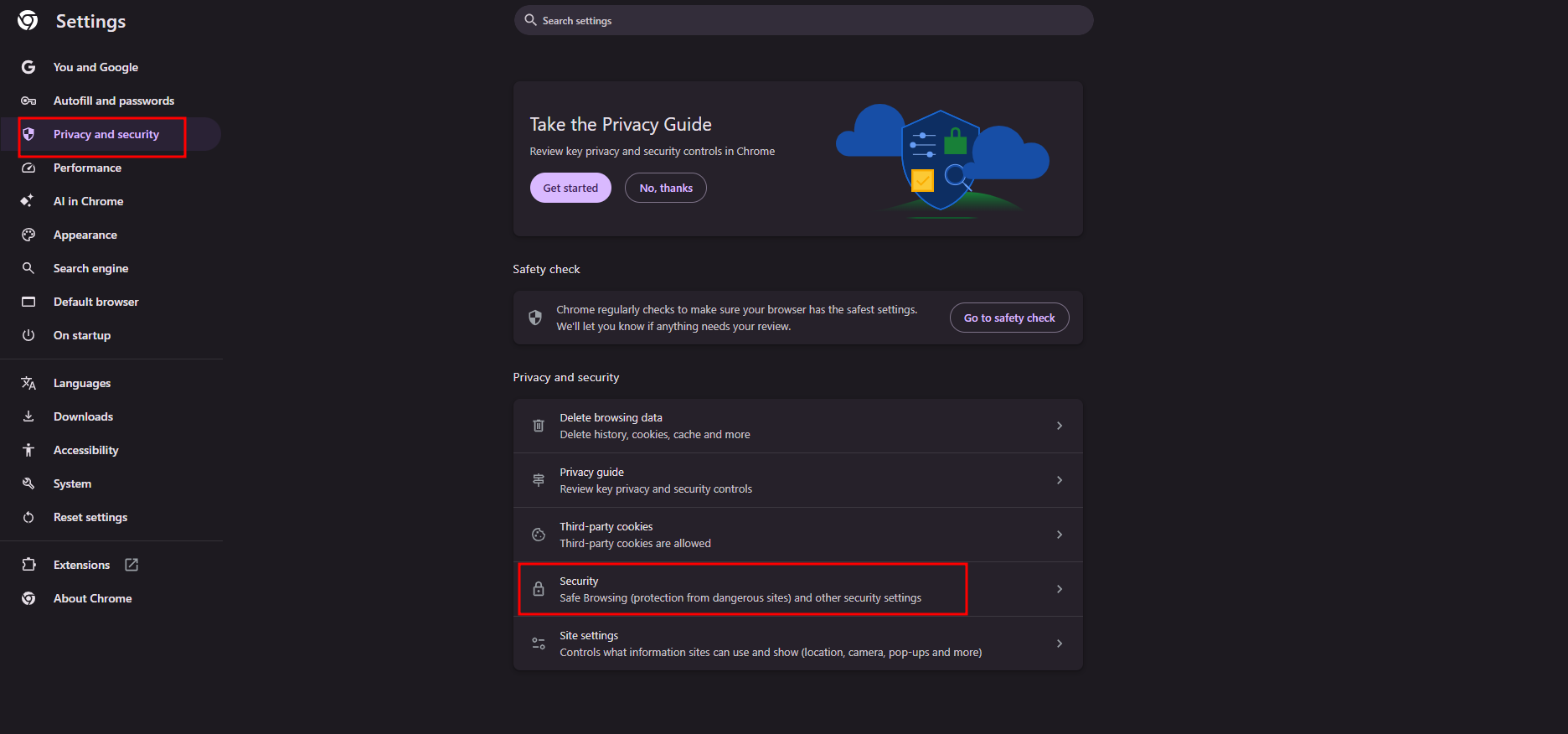
To configure your custom DoH servers, go to Google Chrome or Microsoft Edge. Open your browser and go to settings. Consequently, you can also open it through the link chrome://settings/security or edge://settings/security.
Go to Privacy and Security and click on Security.
Scroll down and click on ‘Use Secure DNS’
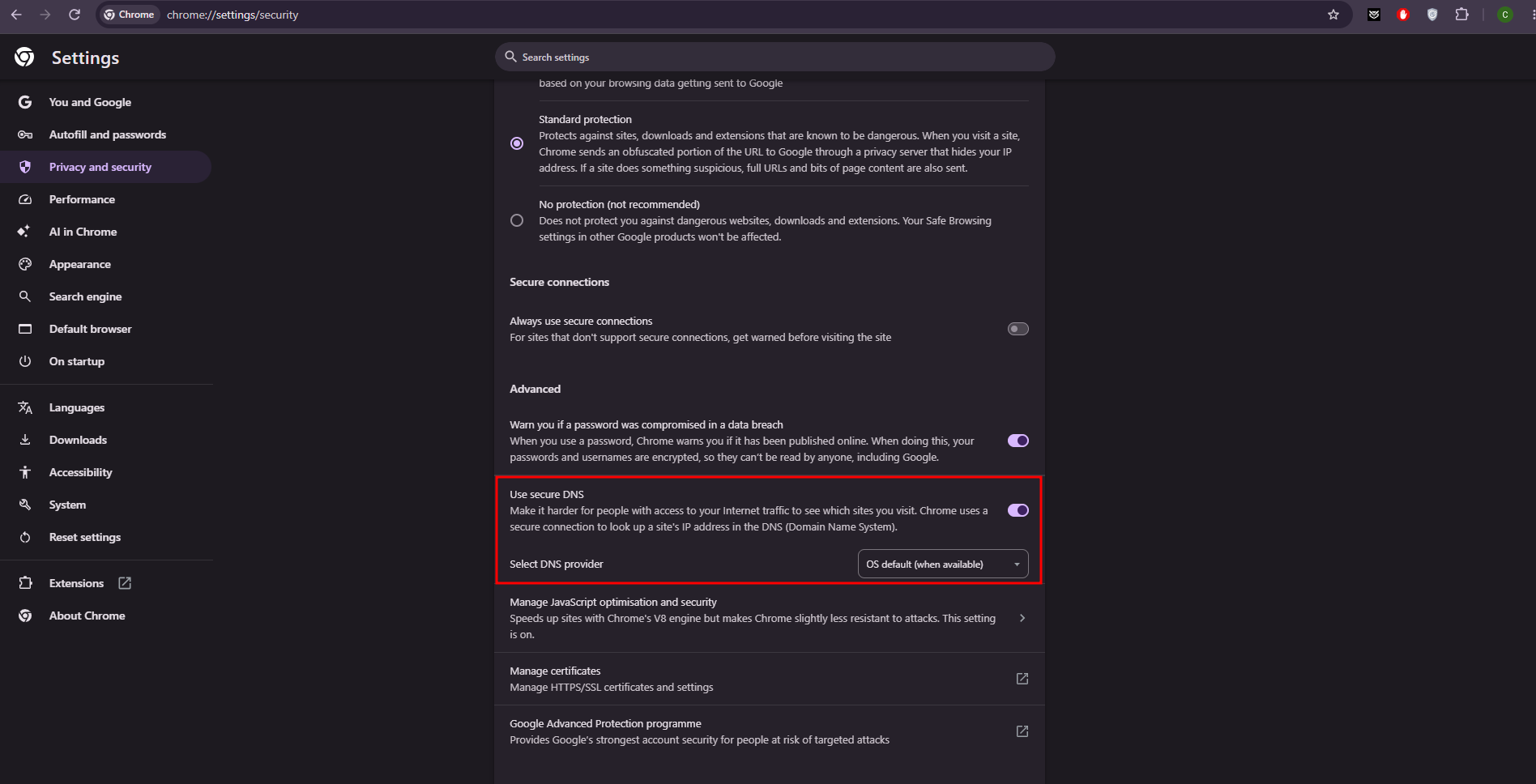
Click on ‘Choose a service provider’ or the related line you see.
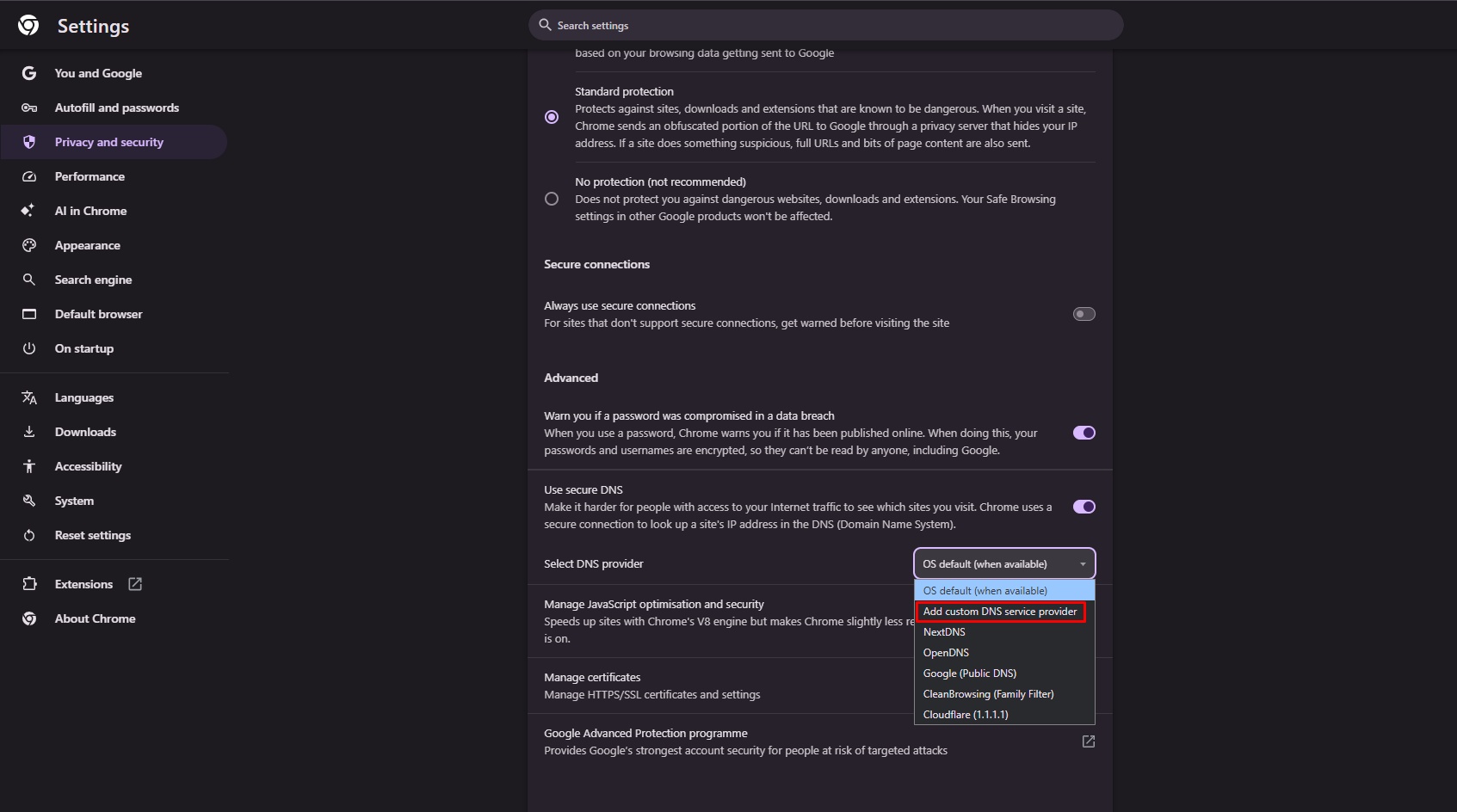
Now paste your preferred custom DoH server provider in the text box.
Test it Before You Switch
Never point a system-wide setting at an untested endpoint. A dead resolver looks exactly like a dead internet connection, and the symptom gives you no clue about the cause.
Check it from the command line first. With curl, which will resolve the hostname through whichever DoH server you name:
bash
curl --doh-url https://dns.quad9.net/dns-query https://example.com -o /dev/null -s -w '%{http_code}\n'
With kdig, from the Knot DNS tools, which shows you the actual DNS response:
bash
kdig -d @dns.quad9.net +https example.com
Then sanity-check the answers. Resolve various domains you know well and compare the results against a resolver you already trust.
A server returning different addresses for common sites or NXDOMAIN for things that obviously exist is either filtering more aggressively than advertised.
While testing the DNS server, measure how long it takes to answer several DNS queries. You can paste the endpoint straight into our DNS speed test using the Custom DoH Server option, and compare its response time against Cloudflare, Google and Quad9 from your own location.
This is because the server may respond much faster or slower depending on where you are located. Once it's configured, Cloudflare's diagnostic page at 1.1.1.1/help will confirm whether your browser is genuinely using encrypted DNS.
What DoH Don’t Do?
People usually expect more from DoH than it actually gives. But the truth is your ISP still sees the IP addresses you connect to. And unless both your browser and the website support Encrypted Client Hello, it can also see the website name in the connection handshake. DoH hides the question you asked, not where you went afterwards.
The resolver still sees you. You haven't removed the watcher; you've just picked a different one. That choice is the whole point of switching.
Moreover, office networks that use internal domain names, network printers, NAS drives and hotel or airport Wi-Fi login pages all rely on the local DNS server. When you bypass it, those stop working until you add exceptions.
It can be blocked as well. There are public lists of known DoH server addresses, kept updated so network admins can block them and force everyone onto their own resolver. Rules also vary by network and by country. So it's worth checking what's allowed where you are.
FAQs
Does setting a custom DoH server in Chrome cover my whole device?
No. It only covers Chrome. Your email app, Steam, background updaters and any other browser will keep using whatever DNS server your router gave them. To cover everything, set it in your operating system's network settings and not in the browser.
What happens if my custom DoH server goes offline?
It depends where you set it up. Chrome and Edge usually switch back to your normal system DNS without telling you. So you lose the privacy benefit without noticing. A strict setup at the OS or router level usually won't switch back at all. Thus lookups simply fail and sites stop loading. It's worth knowing which of these you've chosen.
Can I run a custom DoH server and a VPN at the same time?
You can, but usually only one of them actually takes effect. Most VPN apps grab all DNS traffic and send it through their own server. So your custom one gets ignored. Some VPN apps have a setting that lets you keep your own DNS. If yours doesn't, run a DNS leak test rather than assuming it worked.
Will switching to a custom resolver let me reach sites my ISP blocks?
Sometimes, but only if it’s blocked simply. If your ISP blocks by giving you a fake DNS answer, a different resolver gets around it easily. If it blocks by IP address or further down at the network level, DNS isn't part of the process and changing it won't help.
How do I check whether a resolver I've never heard of is trustworthy?
To check whether a resolver you have never heard of is trustworthy. You need to look at four things. There should be a named company or organization behind it. It should have a logging policy that says how it saves your log data.
They should also clearly explain how they will use it. Also, server addresses should be listed on their own website. A random endpoint someone posted on a forum doesn’t include any of these. Your resolver sees more about what you do online than almost anything else on your network.
Does DoH include DNSSEC validation?
Not automatically. DoH encrypts the connection between you and the resolver. DNSSEC is a separate check that confirms the answer really came from the domain's owner. Most big providers do both. But it’s recommended to check their page for assurance and not make random assumptions.
Will a custom resolver slow down my browsing?
Usually the difference is a few milliseconds and you won't notice it. What matters is whether the provider has a server near you. One with no servers in your region can add a real delay to every first visit to a site. Repeat visits use your cache. So they're unaffected.
How do I set this up on a phone?
On Android, the Private DNS field wants a DoT hostname, not a DoH web address, so you'd type something like dns.quad9.net and not the full https:// link. iOS has no built-in setting for it. You either install a configuration profile from the provider or use their app. Both add the setting in the whole system.
Can my employer or school see that I changed my resolver?
Usually, yes. Connecting to a known DoH server on port 443 still shows up as a connection to that specific host, and there are published lists of DoH server addresses so admins can spot and block them. On a managed device, IT can also force a particular resolver through policy, which overrides anything you set yourself.
Can I add a backup resolver?
Often yes at the OS level. Some systems also let you add a second DoH address as well. Keep in mind that a backup quietly sends your queries to a different company whenever the main one is slow. So only pick one you'd trust with the same information.